
Media Buying⏱️ 7 min readFor media buyers, affiliates and performance teams
Every media buyer knows the routine: check stats, lower the bid on a zone that’s burning money, raise it on one that converts, blacklist the worst sources, repeat. It works, but it’s slow, and the budget keeps spending while you’re away. Automated bidding does that work for you, using live conversion data to move bids toward what’s working.
SmartBid is Rawbitads’ automated bidding tool. This guide explains what SmartBid is, how automated bidding works in general, what it needs from you to do its job, and how to set it up so it actually saves budget instead of just spending it faster.
🔑 Key takeaways
- Automated bidding adjusts bids for you based on conversion data, instead of you changing them by hand.
- With SmartBid, you set a target CPA; it adjusts bids at the zone level and blacklists underperforming zones in real time.
- It saves budget by moving spend toward sources that hit your target and pulling back from those that don’t.
- It needs accurate tracking: set up your postback before you switch it on.
- Pick a realistic target CPA based on what a conversion is worth to you.
What Is SmartBid?
SmartBid is the automated bidding and optimization tool built into Rawbitads. In Rawbitads’ own words, it “reads your conversion data in real time and automatically adjusts bids at the zone level to push budget toward sources that are hitting your CPA target and pull back from those that aren’t” (advertiser FAQ).
In practice, you set a CPA target and SmartBid automatically adjusts bids and blacklists underperforming zones in real time, so your budget moves toward winners without manual work. It works alongside the bidding models Rawbitads supports: CPC, CPM and CPA, which you can switch at any time without restarting your campaign.
How Automated Bidding Works
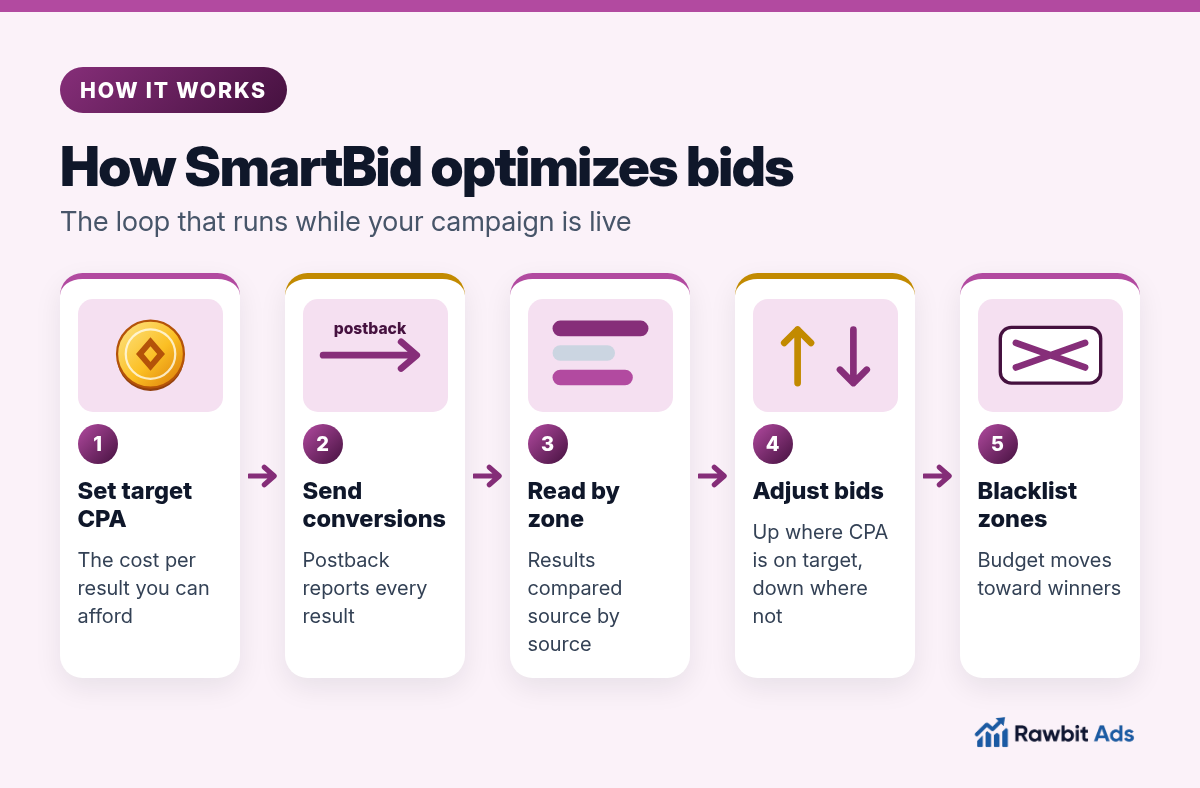
Ad networks sell traffic from many publisher sites and apps, usually grouped into zones or sources. Some zones convert well for your offer and many don’t. Automated bidding is a loop that keeps sorting them:
You set the goal.
A target CPA: the cost per conversion you’re willing to pay.
Conversions come back.
Your tracker or offer sends each conversion to the network with a postback, tagged with the zone it came from.
Results are read by zone.
The system compares each zone’s cost per conversion with your target.
Bids are adjusted.
Zones that hit the target get more of your budget; zones that miss it get less.
Weak zones are blacklisted.
Sources that keep spending without results are cut, so the budget isn’t wasted on them.
The loop keeps running while the campaign is live. As new data arrives, bids keep moving, which is why automated bidding can react faster than someone checking stats a few times a day.
How Automated Bidding Saves Budget
Automated bidding doesn’t make traffic cheaper by magic. It saves budget by spending less of it in the wrong places:
- Less waste on zones that don’t convert. Underperforming zones are blacklisted in real time instead of at your next manual check.
- Better use of zones that do. Budget moves toward sources hitting your target CPA, where it’s earning.
- Fewer overpaid bids. Bids are adjusted to your target, so you’re less likely to keep a high bid on a zone that doesn’t justify it.
- Your time back. Instead of editing bids zone by zone, you can focus on offers, creatives and landing pages, which usually move results more than bid tweaks.
Manual and Automated Bidding Compared
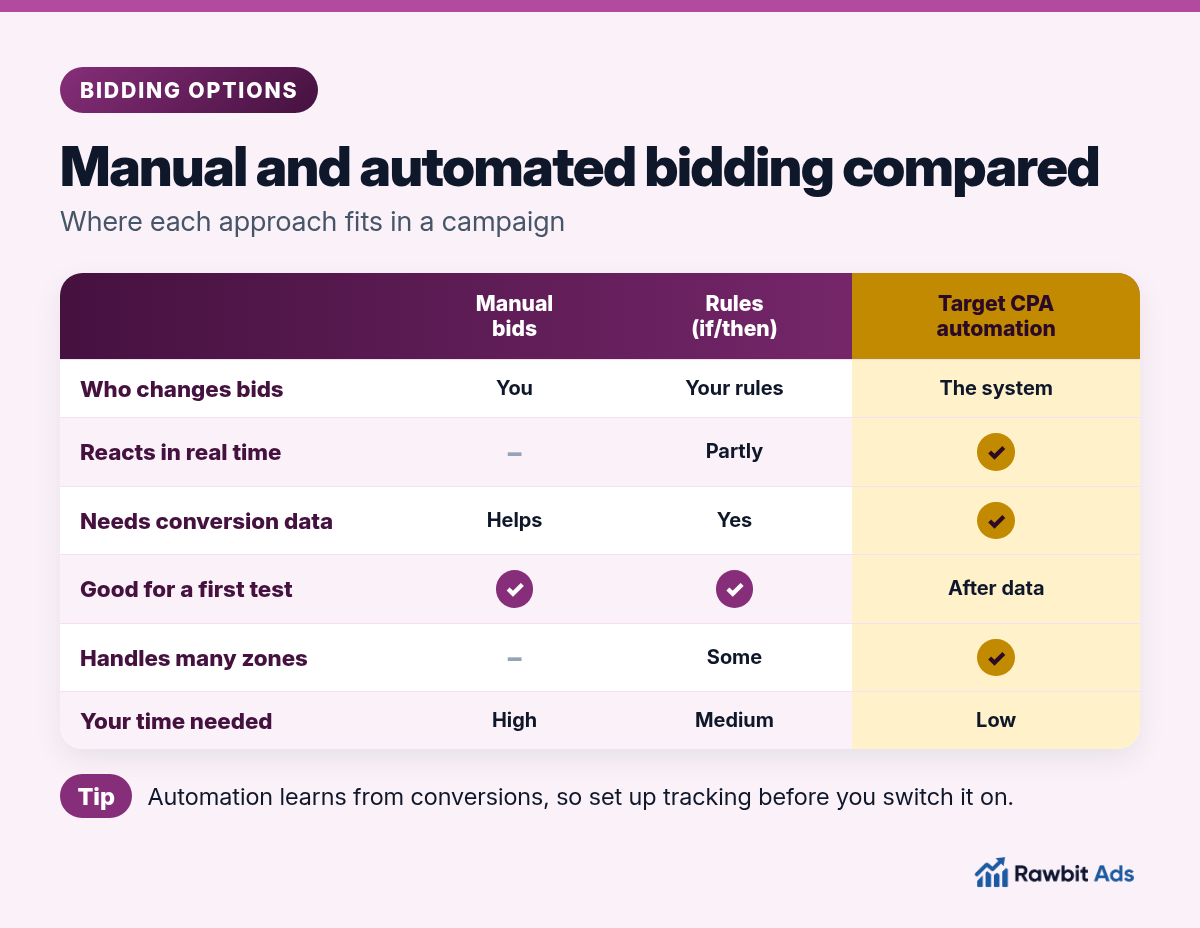
Automation isn’t always the right first step. Here’s where each approach fits:
| Manual bids | Rules (if/then) | Target CPA automation | |
|---|---|---|---|
| Who changes bids | You | Rules you write | The system, toward your target |
| Reacts in real time | No | Partly, when a rule triggers | Yes |
| Needs conversion data | Helps | Yes | Yes, it learns from conversions |
| Good for a first test | Yes | Yes | Better once you have some data |
| Handles many zones | Hard | Some | Yes |
| Your time needed | High | Medium | Low |
A common path is to start with manual bids or simple rules to get a first read on the traffic, then switch on target CPA automation once conversions are coming in. Our bidding models guide explains how CPC, CPM and CPA fit into this.
Set your target CPA on Rawbitads →
What Automated Bidding Needs From You
Automated bidding is only as good as the data and the goal you give it.
Accurate conversion tracking
The system can only optimize toward conversions it can see. Rawbitads supports server-to-server postback tracking: once your postback URL is set in the campaign settings, every conversion is tracked and visible in your dashboard with source-level detail. Send a test conversion before you launch to make sure it arrives.
A realistic target CPA
Work out what a conversion is worth to you. If your payout is fixed, your target CPA has to sit below it for the campaign to be profitable. Set it too low and you may win very little traffic; set it too high and you’ll pay more than a conversion is worth.
The right conversion event
Optimize toward the event you’re paid for, or the closest one you can track. Optimizing for a cheap step that doesn’t lead to revenue teaches the system to find the wrong users. If you work with CPA offers, our iGaming CPA offers guide and crypto CPA offers guide explain which events matter.
A solid campaign setup
Automation adjusts bids; it doesn’t fix a weak offer or a slow landing page. Make sure targeting, creatives and the funnel are in good shape first.
How to Set Up SmartBid
- Create your campaign. Choose the format, bidding model, daily budget cap and targeting (GEO, device, OS, browser, carrier, connection type and time of day).
- Set your postback. Add your postback URL in the campaign settings and confirm a test conversion appears.
- Gather a first read. Start broad to see which zones send traffic and conversions.
- Set your target CPA. Base it on your payout and margin.
- Let it run, then review. Check results by zone and creative. When ROI turns positive, raise the budget; SmartBid keeps optimizing as you scale.
💡 Pro tip
Don’t change the target CPA every few hours. Automated bidding needs time and conversions to learn, and constant changes reset what it’s working toward. Make a change, give it time to settle, then judge the result.
Common Mistakes With Automated Bidding
- Switching it on without tracking. No conversion data means nothing to optimize toward.
- An unrealistic target. A target far below what the traffic can deliver starves the campaign.
- Optimizing for the wrong event. Clicks or cheap micro-steps that don’t lead to revenue.
- Too many changes at once. New creatives, new GEOs and a new target on the same day make it impossible to tell what worked.
- Ignoring the funnel. If the landing page is weak, automation will just find the zones that fail more slowly. See our campaign optimization guide for blacklists, whitelists and bids.
Frequently Asked Questions
What is SmartBid?
SmartBid is Rawbitads’ automated bidding tool. You set a target CPA and SmartBid reads your conversion data in real time, adjusts bids at the zone level and blacklists underperforming zones, so your budget moves toward sources that hit your target.
What is automated bidding?
Automated bidding is when the ad platform adjusts your bids for you based on performance data and a goal you set, such as a target cost per acquisition. It replaces manual bid changes on each zone or source.
How does automated bidding save budget?
It spends less on zones that don’t convert, by lowering bids or blacklisting them quickly, and moves budget toward zones that hit your target CPA. It also saves the time you’d spend changing bids by hand.
Do I need conversion tracking to use SmartBid?
Yes. SmartBid optimizes toward conversions, so it needs to see them. Rawbitads supports server-to-server postback tracking; once your postback URL is set in the campaign settings, every conversion shows in your dashboard with source-level detail.
Can I switch bidding models on Rawbitads?
Yes. Rawbitads supports CPC, CPM and CPA bidding, and you can switch bidding models at any time without restarting your campaign.
Sources
Checked on 22 October 2026: Rawbitads advertisers and advertiser FAQ, Rawbitads formats and the Rawbitads homepage. General automated bidding mechanics are described from how target CPA bidding works across ad platforms.
Let the Data Move Your Bids
Automated bidding saves budget by spending less where traffic doesn’t convert and more where it does. Set up tracking, choose a realistic target CPA, give it time to learn and spend your own time on the offer and the funnel.
📚 Related guides
Let SmartBid work toward your target CPA
Set a target CPA and SmartBid adjusts bids and blacklists underperforming zones in real time, across push, pop, native and more, with no minimum spend in 220+ GEOs.
Try SmartBid →