
Ad Formats⏱️ 8 min readFor media buyers and affiliates
Popunder traffic is visitors who reach your landing page through a popunder ad: a new tab or window that opens behind the page someone is reading. When they finish and switch tabs, your page is already loaded and waiting. It is one of the cheapest ways to put a full landing page in front of a lot of people, and one of the fastest ways to learn whether an offer converts.
This guide explains what pop traffic is, how popunder ads differ from popups, which offers suit the format, and how to launch and optimize a popunder campaign without wasting your test budget.
🔑 Key takeaways
- Popunder traffic sends users to your full landing page in a background tab. There is no banner or headline, so the page itself is the ad.
- It is bought for volume and speed of learning, usually on CPM, which makes it a strong format for testing offers, GEOs and landers.
- Visitors arrive cold, so page speed, a clear first screen and sometimes a pre-lander decide whether you profit.
- Optimize at the zone level and split campaigns by GEO and device so your winners don’t hide in the averages.
What Is Popunder Traffic?
The Cambridge Dictionary defines a pop-under as “an advertisement that is shown in a new window behind the window that you are looking at on a website.” In ad-network terms, popunder traffic is the stream of visitors those background windows deliver to advertisers.
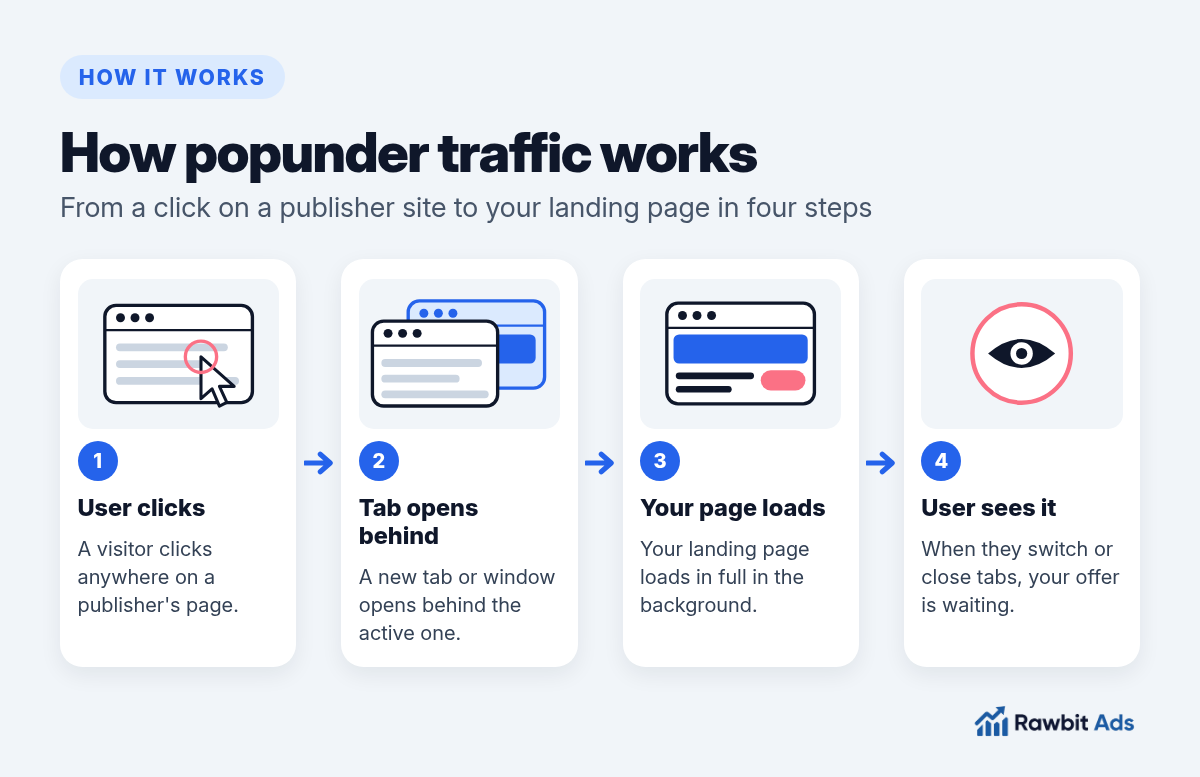
Here is the typical flow:
- A user visits a publisher’s site and clicks somewhere on the page.
- A new tab or window opens behind the active one and loads your landing page.
- The user carries on with what they came to do.
- When they close or switch tabs, your page is fully visible and ready to convert.
Because the whole page loads, you don’t have to win a click on a small creative first. That is why popunder ads are often described as having no banner blindness: there is no banner to ignore. On Rawbitads, pop ads are 100% viewable with zero banner blindness and can be bought on CPM or CPA.
What is pop traffic?
People often use “pop traffic” as an umbrella term for several formats that open your page in its own tab or window instead of inside the page. The YouTarget guide to pop traffic groups popunder, clickunder, popup and direct click together, because ad networks usually sell them the same way: in volume, priced per thousand impressions.
Popunder vs Popup: What’s the Difference?
The two names sound alike, but the user experience is very different.
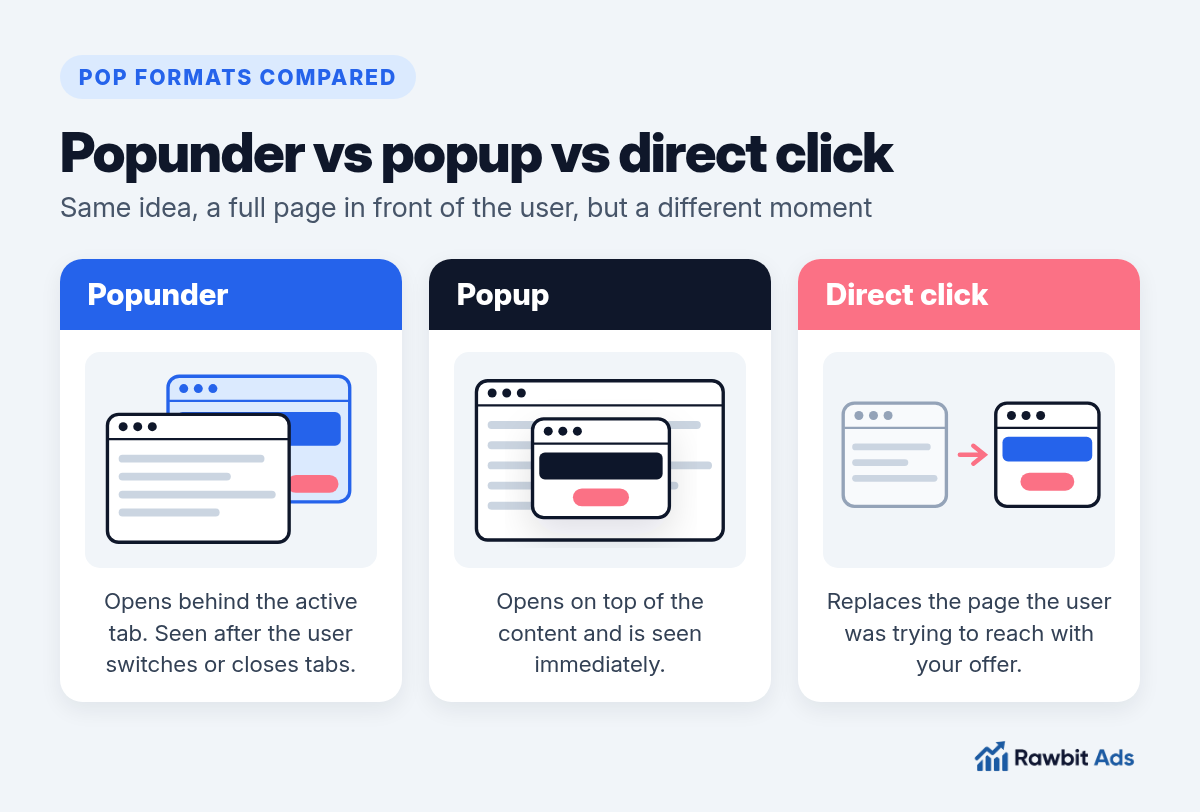
- A popup opens on top of the content. The Coalition for Better Ads describes pop-up ads as interstitials that “pop up and block the main content of the page,” and lists them among the experiences visitors complain about most.
- A popunder opens behind the active window. The user isn’t interrupted, and they meet your page when they’re done with the current one.
- A direct click (domain redirect) replaces the page the user was trying to reach with your offer. It’s a separate format with its own intent profile.
| Popunder | Popup | Direct click | |
|---|---|---|---|
| Where it opens | New tab or window behind the active one | Window on top of the content | Replaces the current tab |
| When the user sees it | After switching or closing tabs | Immediately | Immediately |
| What you supply | A landing page or pre-lander | A landing page | A landing page |
| Typical pricing | CPM (CPA on some networks) | CPM | CPC or CPM |
Which Offers Work Best With Popunder Ads?
Pop traffic rewards offers that a stranger can understand and act on from a single screen. Typical popunder ads examples include a VPN or antivirus download page, a one-field sweepstakes entry and a casino registration page. It is a common fit for:
- Utilities and antivirus: simple value, quick install or sign-up.
- Sweepstakes: one field, one action, broad appeal.
- iGaming: registration flows that a strong lander can sell on its own. See our guide to iGaming traffic sources for how pop fits next to push and native.
- Finance and subscription offers that convert on a small share of a large audience.
- Offer and GEO testing in general, because you collect data fast.
Pop is a weaker first choice for offers that need a lot of explaining or trust before anyone acts. Those usually do better on native with an advertorial. If you’re still deciding, our push vs pop vs native comparison walks through the trade-offs.
💡 Pro tip
Use pop as a discovery channel. Once you know which GEO, device and lander combination converts, carry that knowledge into push, in-page or native campaigns.
How to Launch a Popunder Campaign Step by Step
Before you buy popunder traffic, plan the test. The setup is simple. What separates a profitable test from a burned budget is the order you do things in.
Set up tracking first.
Connect a tracker or the network’s postback before you spend anything, so every conversion ties back to its zone and GEO. Our iGaming CPA offers guide explains S2S postbacks step by step.
Work out your target CPA.
From your payout, decide the most you can pay per conversion. It drives every bid and every cut.
Pick one GEO and one device type.
Mixing desktop and mobile, or several countries, in one campaign hides what’s working.
Choose CPM or CPA.
CPM gives you raw volume and control. CPA, where it’s offered, shifts more of the risk to the network but can limit volume while the system learns.
Start broad on placements.
Let the campaign run across the network first so you can see which zones convert.
Set frequency and budget caps.
Cap how often one user sees your page, and set a daily budget you’re prepared to spend on learning.
Read the data, then narrow.
Blacklist zones that spend without converting, and keep or raise bids on zones that hit your CPA.
Landing Pages That Convert Cold Pop Visitors
With popunder traffic, the landing page is the creative. A visitor who didn’t ask to see your page will decide in seconds whether to stay.
Make it fast
Google’s Web Vitals guidance recommends that Largest Contentful Paint happens within 2.5 seconds of the page starting to load. Treat that as a ceiling, not a goal. Compress images, drop heavy scripts and avoid chains of redirects.
Make the first screen do the work
The offer, the benefit and the call to action should be visible without scrolling. Pop visitors don’t scroll to find out what you’re selling.
Use a pre-lander when the offer needs context
A short pre-lander, such as a one-question quiz, a quick checklist or a brief explainer, filters out uninterested visitors and warms up the rest before the main offer. Test with and without one; for simple offers a direct link sometimes wins.
💡 Pro tip
Keep the ad promise and the page consistent. If a pre-lander frames the offer one way and the final page says something else, visitors leave and your conversion rate drops.
How to Optimize Popunder Traffic
Most of the work happens after launch. These are the levers that matter most.
- Zones. Performance varies a lot from placement to placement. Review zone-level data regularly, cut zones that spend without converting, and build a whitelist of proven winners.
- Bids. Raise bids on converting zones to win more of their traffic. Lower bids, or stop buying, where cost per conversion sits above target.
- Frequency. Showing the same page to the same person repeatedly rarely helps. Test tighter caps if conversion rates fall as volume grows.
- Dayparting. Compare conversion rates by hour and day, then concentrate spend where they’re strongest.
- Landers. Split-test one change at a time: headline, first screen, CTA or pre-lander angle.
On Rawbitads, SmartBid does part of this automatically. You set a target CPA, and it adjusts bids and blacklists underperforming zones in real time based on conversion data. You can still review zone and conversion data yourself and make manual calls.
💡 Pro tip
Scale winners gradually. Big budget jumps on a fresh winner can push you into lower-quality placements and make results look worse than they are.
Frequently Asked Questions
What is popunder traffic?
Popunder traffic is visitors sent to an advertiser’s landing page by popunder ads: a new tab or window opens behind the page the user is viewing, and they see the ad when they switch or close tabs.
What is the difference between popunder and popup ads?
A popup opens on top of the content and is seen immediately. A popunder opens behind the active window, so the user sees it after finishing what they were doing.
Is popunder traffic good for affiliate marketing?
It can be, especially for testing offers, GEOs and landing pages at volume. Visitors arrive cold, so profit depends on a fast, clear landing page, good tracking and steady zone optimization.
How is popunder traffic priced?
Popunder traffic is usually bought on CPM, meaning per thousand impressions. Some networks, including Rawbitads, also offer CPA buying for pop.
Do I need a pre-lander for popunder ads?
Not always. Simple offers often convert with a direct link to the landing page. A pre-lander helps when the offer needs context or when you want to filter low-intent visitors first, so test both.
Ready to Test Popunder Traffic?
Popunder traffic won’t explain a complex offer for you, but it will tell you quickly whether an offer, a GEO and a landing page can convert. Track every conversion, start broad, cut weak zones and scale what works.
📚 Related guides
Test popunder traffic on Rawbitads
Launch a pop campaign on CPM or CPA from one self-serve dashboard. No minimum spend, no contracts, just traffic you can measure.
Start your pop campaign →